UX and product design · Swaayata · 2024
Protecting 20% of a monthly invoiceby making every action an AI agent takes visible and reversible.
Swaayata is an SLO platform for SRE teams. Fixing a breach by hand took 41 minutes, and the clause lands on the month’s invoice either way. I designed the console, the override and the record that let the team allow the agent to act in seconds instead.
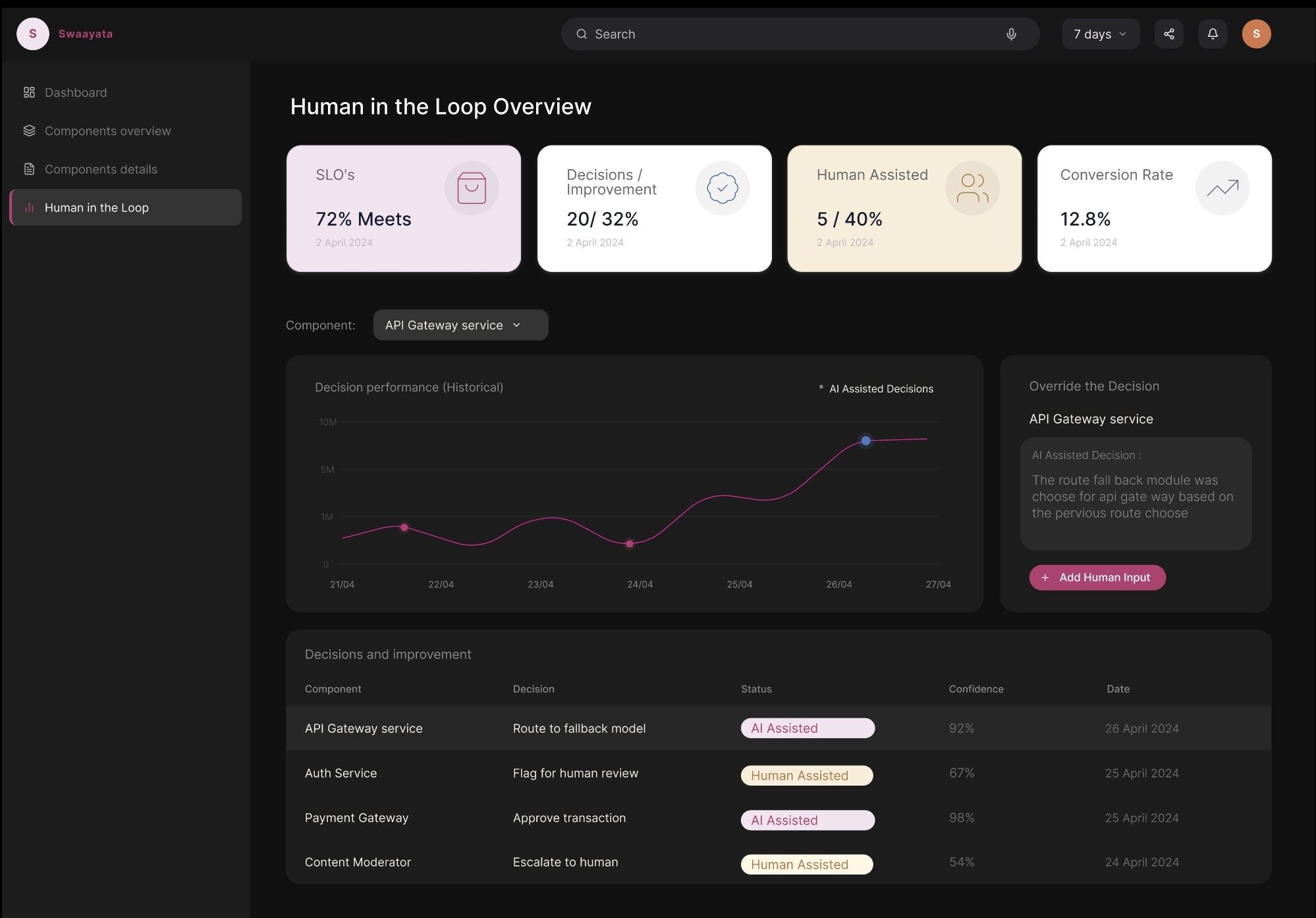
- The agent doesn’t just alert. It acts, and shows its working in the live feed.
Swaayata
The agent could fix an outage in seconds. Nobody could watch it, stop it, or explain it afterwards.
Lead Product Designer. I owned the console and its four routes, the human-in-the-loop layer, the reasoning graph, and the loading and failure states the build never had.
Permission, not autonomy. So I designed the three moments a person is watching: a console before the agent acts, an override during, a record for the morning after. No approval queue, because a queue costs the minutes it protects.
41 minutes from alert to fix, timed on the team’s own path. Designed down to under five, with 70% of repeat incidents resolved without a human.
The agent takes the heavy, predictable work. The team keeps the judgment.
The design thesis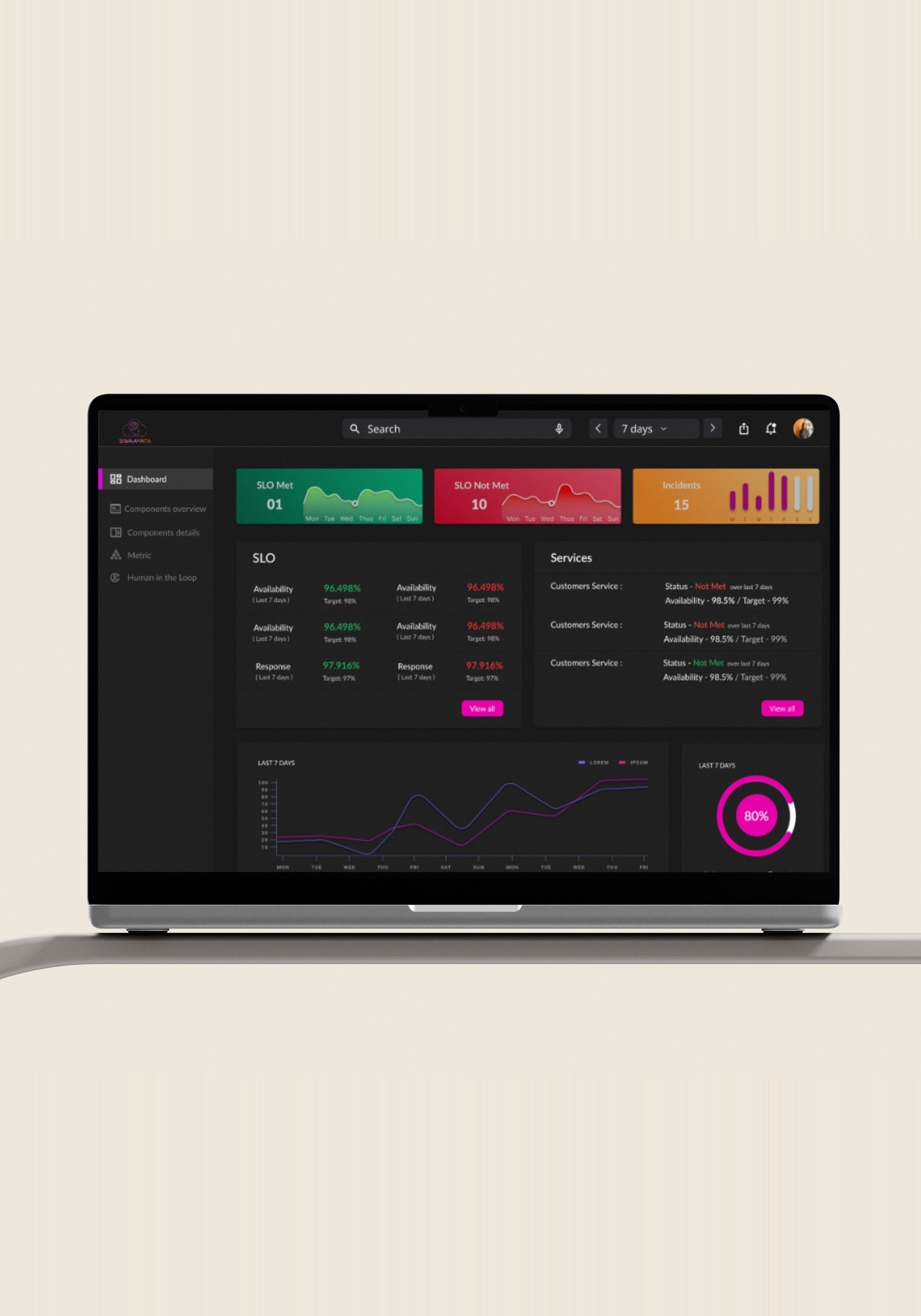
The invoice moves faster than the engineers do.
The agent could fix an outage in seconds. But who would watch it, stop it, or explain it afterward?
A service level agreement is the uptime a company signs for. The SLO is the tighter internal target that protects it. Miss it and a credit lands on the next invoice, with no approval and no appeal. The engineers were not slow; they were doing the only thing they were allowed to do, and it took forty-one minutes. Not a monitoring problem. A billing problem.
One measured herself, one modelled from the contract terms.
The brief was autonomy. The blocker was permission.
The agent worked. Every conversation still ended in the same place. Most of an autonomous system runs with no one watching, and it should. What needs designing is the small number of moments where a person is watching, and deciding whether to keep letting it run.
Which turned one vague problem into three specific ones, in the order an engineer asks them.
See it
“Are we actually meeting our commitments?”
Asked every morning, by someone who is not on call
A console that answers before a number is read, then lets you go down two levels without ever losing the answer. It also has to answer for an engineer who cannot see the colours.
Answered in Decision 01The consoleSwaayata is an SLO platform, not a bigger dashboard.
It sits on the monitoring a team already runs, turning a signed uptime promise into a live target the agent can act inside before a breach reaches an engineer. The three questions above become three coordinated surfaces: a console that answers are we fine, an override that lets the agent act without a queue, and a reasoning graph that survives being asked why. One decision path, built as three screens, because a person needs to trust each moment on its own.
The first console showed everything. It answered nothing.
Engineers already have every metric they could want. The first build gave them all of it at equal weight, which is a data problem solved and a judgment problem untouched. Status moved to the top, and the detail underneath it opens in place: nobody has to leave the glance to read the history behind it.
A 99% target allows 1% of failure, the error budget: a monthly allowance for downtime. What matters is not how much is spent, but how fast. 60% gone by day 27 of 30 is fine, the month is nearly over. 60% gone by day 2 is not, since at that pace it runs out three weeks early. Past 100% the promise is already broken, and some services below read 150% instead of 100%.
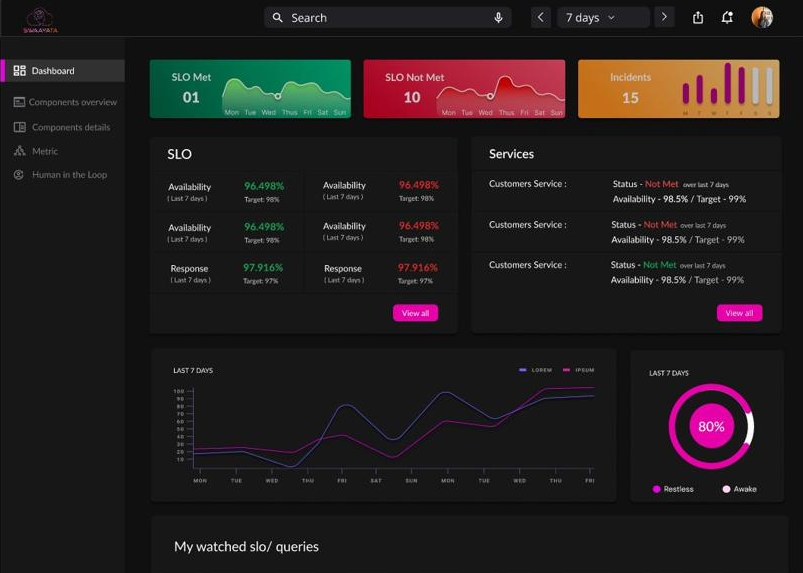
Status first, detail on demand
Answers the one question a manager asks each morning, in colour, before a number is read. It counts: 1 met, 10 not met, 15 incidents.
Name a single service. A count is not something you can act on.
The first build put forty metrics here at equal weight and answered nothing. Counting became the only job this screen has.
Position is the answer
Ranks. The only surface holding names and targets beside each other, sorted by error budget spent.
Show anything inside a service. No metrics, no history, no reasoning.
The sort order is the answer. Position carries severity before any colour is read, which is also what makes this screen work for someone who cannot see the difference between the red and the green.
A name is not yet a cause.
Now the breach has a name. A name is not yet a cause.
Rung 02 ends with checkout-api at the top of the list and a scope line the next screen inherits. It does not say what inside that service moved, when it moved, or whether anybody acted. The last two rungs answer that, and they are the same route: 03 is the screen as it was built, 04 is that screen with one row opened. The states after them are new work, and labelled as new work.
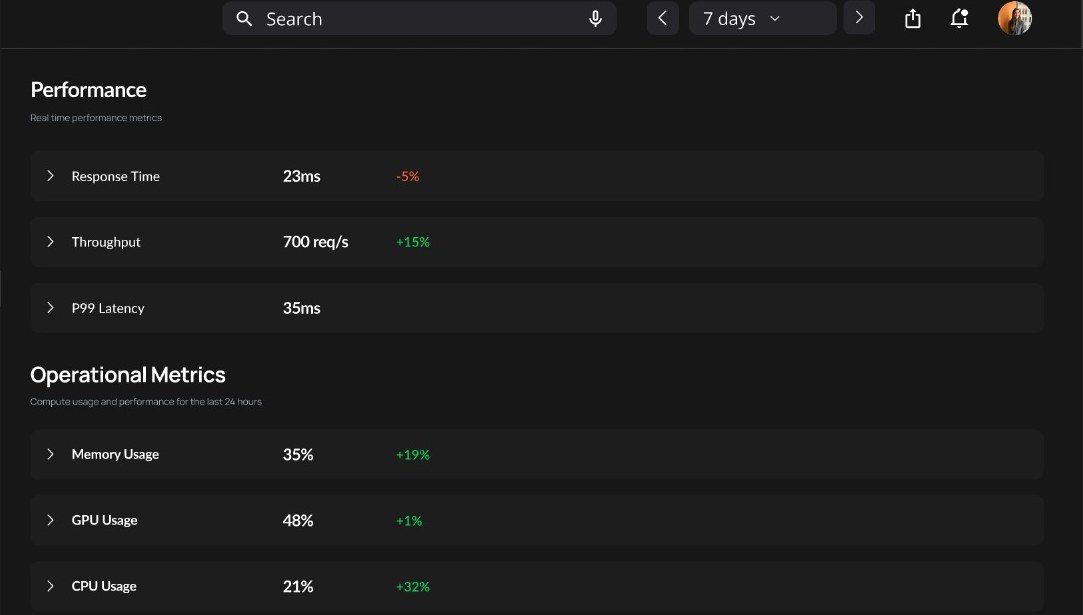 Performance block · 3 of 6 rows
A delta is not a history
Six metrics for one service, each with its current value and its movement over seven days. p95 Latency 24 ms, down 5%.
Tell you when it moved, or by how much, or whether it crossed anything.
Every row with a target opens. p99 Latency has no target set in Metric, so it does not open, and the row says that rather than failing silently.
Detail arrives in place
Draws the metric against its own SLO target, in place, with the 03:41 crossing on it and the seven day register underneath.
Navigate anywhere. The row header, the value and the delta all stay on screen.
Nobody ever loses the glance. I watched someone lose the top of the screen to read a graph, so the graph came to them instead.
Holds the row open when the value has not arrived, or cannot. Same component, same layout, two states it never had. A gap in collection is never drawn as a zero, and an unread metric is never drawn as a healthy one.
Skeleton, not a spinner. Nothing moves, because a pulse that never changes state is decoration. The row name holds position so the page does not jump.
The scrape for this target last succeeded at 02:14, 17 minutes ago. This is not a reading of zero, and the agent has not acted on it.
An error has to say what is not known, not just that something broke.Missing data must never read as a healthy zero, because that is the reading that lets a breach pass unnoticed.
Which answers what the screen has to show. It says nothing about who is allowed to act on it without asking first, and that was the harder call.
The safe answer costs the thing it protects.
The safe answer was an approval gate. It fails on its own terms.
Oversight by choice, not a gate
The obvious answer is a human who approves each action. I designed it, then timed it: nineteen minutes to acknowledge, while the credit clause keeps burning. The gate protects nobody from the thing that actually costs money.
So there is no gate. The agent acts, states its reason before it moves, and logs the decision with its confidence. Every action stays one click from rolled back for twenty-four hours, and the log says so on every entry.
The price: the agent can be wrong in production before anyone sees it. That is the honest cost of a system that acts.
Which means the agent now acts alone, on its own confidence, with no one in the room. The record it leaves behind has to survive being questioned the next morning.
The derivation is the artefact, not the conclusion.
A log is a record. It is not an explanation.
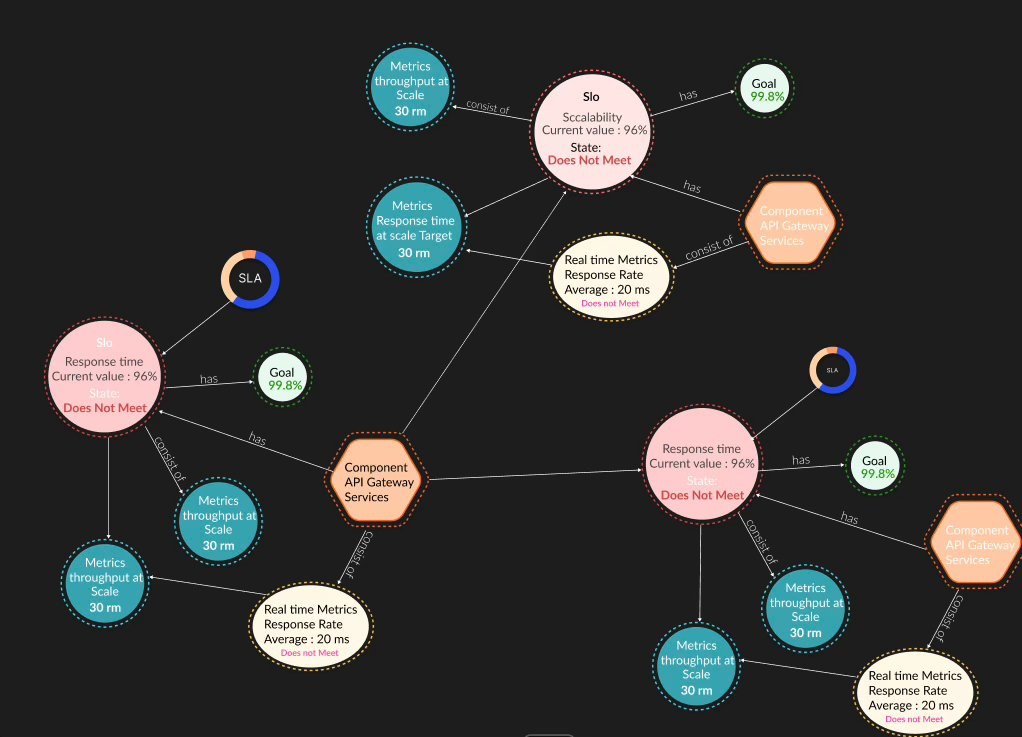
The chain, with the break marked
A log line tells an engineer what happened, never why. “Agent restarted container X” is a record, not an explanation. They were reconstructing the reasoning by hand at exactly the hour they had least capacity for it.
So the surface became the derivation instead of the log line: the signed clause, the target it became, the component it binds to, and the number that broke it. Here that chain is 99.9% monthly availability, signed, down to p95 under 30 ms, the SLO that protects it, down to p95 = 34 ms, the reading that breached it.
The price: every entity has to be modelled and named before a single node can be drawn. A wrong parse still draws a clean graph, and nothing on the screen says so.
See it, stop it, understand it: three decisions, one thread. What that thread actually shipped, in six months, is below.
Six months, concept to handoff.
The agent takes the heavy, predictable work. The team keeps the judgment. I designed the part that lets an engineer believe that at 03:41, and stop it if they do not.
Every screen assumes the agent has a confident read. None of them has a state for the one it does not.
When the agent hits a pattern it has never seen, it either acts confidently on something it does not understand, or it escalates with no context, leaving someone to reconstruct the incident at 3am. And the override that is meant to become a training signal only fires when nothing is burning: at 03:41, with a real breach live, an engineer hits override and moves on, so the loop sharpens in exactly the calm conditions where it matters least.
i can describe both gaps precisely. i have not designed the answer to either.
Qlarc.
Vendors had the AI governance. Buyers required proof of it. The gap between them was killing deals.